How to load birkly-client.js so template tags render — same host as the CMS, external websites, and when to consider SSR instead.
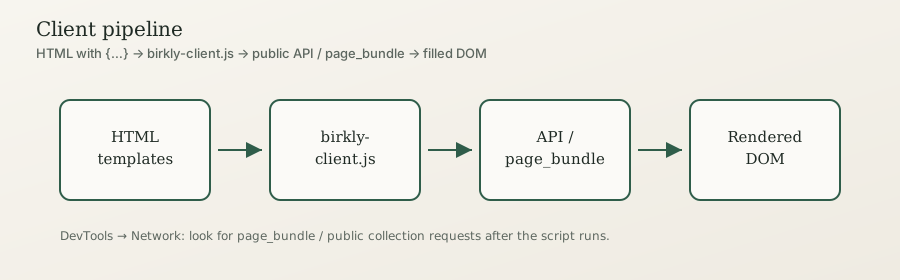
In short: Every templated HTML page needs <script src="/birkly-client.js"></script>. If the site is not on the same origin as Birkly, add data-cms-url="https://your-cms.example". Without the script, visitors see raw {for each…} text. Active plugins (User, Commerce, Events) load their storefront scripts automatically — do not add separate /plugins/…/storefront.js tags. See Project sites and plugins. The default is client-side rendering; SSR is optional for SEO/performance budgets.
Beginner
Same host (project preview / CMS-served site)
When HTML is served from the CMS (e.g. /project/index.html):
<script src="/birkly-client.js"></script>Optional enhance helpers (active nav, etc.):
<script src="/birkly-client.js"></script>
<script src="/birkly-components.js"></script>
External website (different domain)
<script src="https://cms.example.com/birkly-client.js"
data-cms-url="https://cms.example.com"></script>srccan be absolute to the CMS host or a local copy of the script.data-cms-urlmust point at the CMS base URL so API calls succeed (and CORS must allow your site).
Checklist
- Script is on every templated page (list, detail, contact).
- Collection fields exist before you write loops (see Content model).
- Entries are published.
- Links use your site URL prefix (
/project/…when that is your prefix — askget_project_info/ admin Project settings). - Open DevTools → Network and confirm a page bundle / public API call succeeds.
Client vs SSR (plain language)
| Mode | What happens | Choose when |
|---|---|---|
| Client (default) | Browser loads HTML, script fills tags | Most sites, reference projects, local preview |
| SSR / bake | Server (or build) fills tags before send | Strict SEO/first-paint budgets — SSR, Production optimization |
Start with the client. Add SSR only when you have measured a need.
Advanced Users
For developers & AI
Boot sequence
- Parse
data-cms-url(else same origin). - Discover regions (syntax /
data-birkly-region/<birkly-region>). - Prefetch
site_elements; build page_bundle requests for collections seen in markup. Birkly.processTemplates()→ replace tags → emit events.
Programmatic
await Birkly.processTemplates();
await Birkly.processTemplates({ root: el, silent: true, force: false });
Language switcher — data-birkly-language-select on a <select> (Multilingual).
Forms — {entry for} hydrates after the engine emits placeholders (Public forms templating).
CORS: External sites need the CMS to allow the site origin for public API / submit.
AI / WebMCP: Website tools are separate from CMS MCP. Connect AI apps under Settings → AI. See Website tools and MCP connections.
Common failures
| Symptom | Fix |
|---|---|
Raw {for each…} visible | Missing script or wrong path |
| Empty page | Unpublished entries / wrong collection slug |
| CORS errors | Set data-cms-url; allow origin on CMS |
| Unstyled assets | Wrong site URL prefix |