Format system date fields (created_at, updated_at, published_at, and date-typed custom fields when exposed) with the format filter — PHP-style tokens inside double quotes.
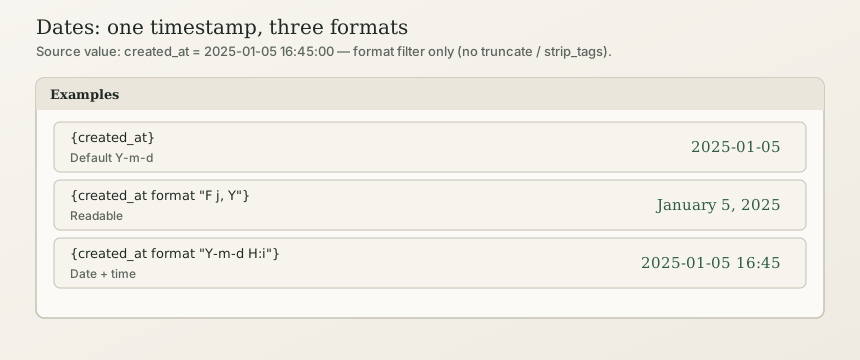
In short: Write {created_at format "F j, Y"} for “January 5, 2025”, or {created_at format "Y-m-d"} for 2025-01-05. Bare {created_at} defaults to Y-m-d. There is no { date "…" } helper — that form is a phantom and will not work.
Beginner
Correct syntax
<time datetime="{created_at}">{created_at format "F j, Y"}</time>Inside a loop:
{for each entry in 'blog' with status = published ordered by newest}
  <h2>{title}</h2>
  <time>{created_at format "F j, Y"}</time>
{endfor}
Common formats
| Goal | Template | Example |
|---|---|---|
| Default / ISO date | {created_at} or {created_at format "Y-m-d"} | 2025-01-05 |
| Readable | {created_at format "F j, Y"} | January 5, 2025 |
| Date + time | {created_at format "Y-m-d H:i"} | 2025-01-05 16:45 |
| US style | {created_at format "m/d/Y"} | 01/05/2025 |
| Full datetime | {created_at format "Y-m-d H:i:s"} | 2025-01-05 16:45:00 |
Format letters (supported set)
| Code | Meaning |
|---|---|
Y | 4-digit year |
m | Month 01–12 |
d | Day 01–31 |
H | Hour 00–23 |
i | Minutes |
s | Seconds |
F | Full month name |
j | Day without leading zero |
Stick to this table — extra PHP tokens may not be implemented in the client.
Guard empty dates
{if entry has created_at}
  <time>{created_at format "F j, Y"}</time>
{endif}
Advanced Users
For developers & AI
Canonical form (TEMPLATE_LANGUAGE_SPEC)
{created_at format "Y-m-d H:i"}- Filter name is
format(only date filter today). - Applies to system date fields such as
created_at,updated_at,published_at. - Not implemented:
truncate,strip_tags, relative “2 days ago”,{ date "…" }.
Phantoms
| Wrong | Right |
|---|---|
{ date "F j, Y" } | {created_at format "F j, Y"} |
{ published_date "Y-m-d" } | {published_at format "Y-m-d"} (or your real field + format) |
{created_at "Y-m-d"} (missing format) | {created_at format "Y-m-d"} |
Ordering vs display
Sorting uses ordered by newest / oldest (created_at), not format strings. See Loops and lists.