Birkly fills your HTML with CMS content using a plain-English template language: placeholders like {title} and blocks like {for each entry in 'blog'}…{endfor}. The browser script birkly-client.js (or optional SSR) replaces those tags with live data.
From Guide: The How it works → Site & templates card in admin Guide links here when you are ready to connect project/ HTML to your entries.
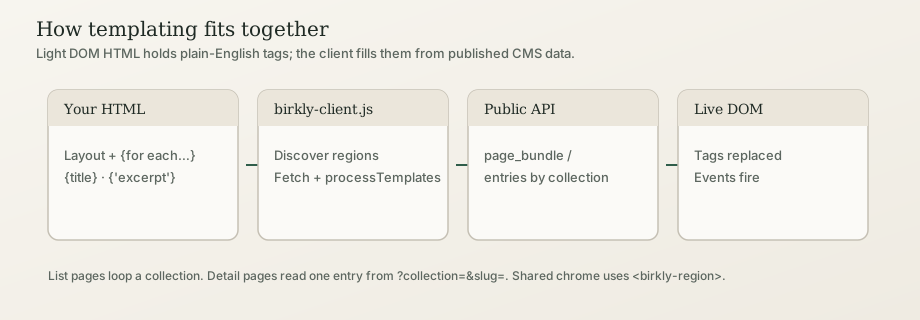
In short: Write normal HTML, leave slots where content should come from Birkly, and load birkly-client.js. Collections are quoted ('blog'). System fields are bare ({title}, {slug}); user-defined fields use quotes ({'excerpt'}, {'price'}). List pages loop a collection; detail pages read one entry from the URL — they must not loop the whole collection.
Canonical engine reference: Birkly repo docs/TEMPLATE_LANGUAGE_SPEC.md (Template Language Spec v1.0). Human SSOT pointer: Canonical template syntax.
Beginner
Mental model
| Piece | Role |
|---|---|
| Your HTML | Layout and template tags in the Light DOM |
| Collections & entries | Content you edit in admin |
birkly-client.js | Fetches published data and replaces {…} tags |
| Public API / page bundle | Where the client loads entries |
You do not paste every blog post into HTML. You write a loop once; new published entries appear automatically.
Three page patterns
| Pattern | When | Approach |
|---|---|---|
| List | Many items of one type | {for each entry in 'blog' …}{endfor} |
| Detail | One item from a link | URL ?collection=blog&slug={slug} + {title} / {'content'} — no collection loop |
| Shared chrome | Header/footer on every page | <birkly-region> or {from 'site_elements' get entry '…'} |
See Detail pages & URL context and Regions / web components.
Minimal example (blog list)
<!DOCTYPE html>
<html lang="en">
<head>
  <meta charset="UTF-8">
  <title>Blog</title>
</head>
<body>
  <h1>Blog</h1>
  {for each entry in 'blog' with status = published ordered by newest}
    <article>
      <h2><a href="post.html?collection=blog&slug={slug}">{title}</a></h2>
      {if entry has 'excerpt'}
        <p>{'excerpt'}</p>
      {endif}
      <time>{created_at format "F j, Y"}</time>
    </article>
  {endfor}
  <script src="/birkly-client.js"></script>
</body>
</html>
Every templated page needs the client script. On an external site (different domain than the CMS), add data-cms-url="https://your-cms.example". See Client setup. When User, Commerce, or Events plugins are active, storefront behavior loads automatically — Project sites and plugins.
Learning path
- Client setup — script tag, same-host vs external, SSR vs client
- Project sites and plugins — plugin storefront auto-load, member gates,
Birkly.fetch - Variables and output —
{title}vs{'field'} - Loops and lists —
with,ordered by,limit - Detail pages & URL context —
.current, anti-patterns - Conditionals · Dates · From…get
- Public forms templating · Worked site walkthrough
- Cheat sheet — quick reference + phantoms
Where does replacement happen?
- Browser (default):
birkly-client.jsdiscovers regions, loads a page bundle, replaces tags. Used by all reference projects. - Server (optional): PHP / Astro / Next can pre-render the same syntax. See SSR and build-time and Production optimization.
Advanced Users
For developers & AI
Architecture
- Template HTML contains Birkly syntax in the Light DOM.
- Client discovers regions (syntax-bearing nodes,
data-birkly-region, or<birkly-region>). - Page bundle / public API loads published entries (and always prefetches
site_elements). - String engine (
Birkly.render/processTemplates) replaces tags. - Events:
birkly:region-processed,birkly:templates-processed.
Light DOM vs Shadow DOM
| Surface | Template language | How to render |
|---|---|---|
| Light DOM | Yes — {for each}, {from}, regions | Write tags in markup |
| Shadow DOM | No auto-scan | Fetch API + Birkly.render(html, data) |
Core rules (must match the engine)
- Collections always in single quotes:
'blog'. - User fields quoted:
{'content'}. System:{title},{slug},{created_at}. - Ordering:
ordered by newest/oldest/last-updated/order— notsort="date:desc". - Dates:
{created_at format "Y-m-d"}— not{ date "…" }. - Single entry:
{from 'blog' get entry 'slug'}…{endget}— not{entry 'blog'.'slug'}…{endentry}(phantom; forms use{entry for}which is different). - No Jinja/Liquid: not
{{ }}, not{% for %}.
Interlinks for agents
| Topic | Doc |
|---|---|
| Field types / schema | Field types |
| Sub-collections model | Sub-Collections |
| Forms | Public forms templating, Public forms |
| WebMCP / AI | Website tools, Agent Guide |
| Connect AI apps | Settings → AI — MCP connections |
| Spec (CMS repo) | docs/TEMPLATE_LANGUAGE_SPEC.md |